This site (the one you’re reading right now) is built with Astro. Not a demo project, the actual thing: content collections, dynamic OG images, dark mode, search, all of it. This is a walkthrough of the real decisions behind it, not a generic “getting started” tutorial.
Why Astro for this
Most of what this site does is render content that rarely changes: posts, project write-ups, an About page. That’s exactly the case Astro is built for. It renders everything to static HTML at build time by default and ships zero JavaScript unless a piece of the page actually needs to be interactive. Compare that to reaching for a full React/Next app for a blog, where the framework ships a hydration runtime for pages that never needed one in the first place.
The one place this site does load client JavaScript is the search box and the theme toggle, both small, both isolated. That’s Astro’s island model: static by default, interactive only where you opt in.
Content as data, not templates
Posts, projects, and static pages here are all Astro content collections, each with a real Zod schema rather than loosely-typed frontmatter:
const posts = defineCollection({
  loader: glob({ pattern: "**/[^_]*.{md,mdx}", base: `./${BLOG_PATH}` }),
  schema: ({ image }) =>
    z.object({
      author: z.string().default(config.site.author),
      pubDatetime: z.date(),
      title: z.string(),
      draft: z.boolean().optional(),
      tags: z.array(z.string()).default(["others"]),
      description: z.string(),
      // ...
    }),
});
That schema is the whole point. Get a date wrong, forget a required field, typo a tag, and the build fails at compile time instead of shipping a broken page. Writing a post becomes filling out a form the type system checks for you, not hoping you remembered every frontmatter key correctly.
The projects collection works the same way, its own schema with fields like stack, articleUrl, and sourceUrl, so a project card on the homepage can conditionally render an “Article” or “Source” button just by checking whether those fields are set. No template branching logic scattered through the page, the data shape does the work.
Styling: Tailwind v4 and CSS variables, not a theme file
Tailwind v4 drops the old tailwind.config.js in favor of a Vite plugin and @theme blocks directly in CSS. This site’s entire color system is seven CSS custom properties (--background, --foreground, --accent, --muted, --border, and their two counterparts) defined once for light mode and once for dark, then referenced everywhere through Tailwind utilities like bg-background and text-accent. Switching the whole site’s palette is a one-file change, not a find-and-replace across components.
Fonts work the same way: a heading font token, a body font token, and a monospace token, each mapped to an actual font family in one place. Astro’s built-in <Font> component handles the loading and preloading for the two Google Fonts in use.
What actually broke, and what I’d tell someone starting today
Static assets and raw HTML don’t mix well. Early on, I tried embedding an animated SVG diagram directly in a post’s markdown. Astro’s markdown pipeline re-parses embedded raw HTML, and it silently lowercases case-sensitive SVG attributes like attributeName and keyTimes, which quietly breaks any SMIL animation with no error at all. The fix was moving anything like that into public/ as its own file and embedding it with a plain <object> tag. Static assets in public/ are copied byte-for-byte, untouched by any content processing.
Draft and scheduled posts need to behave differently in dev than in prod. A post’s draft: true should hide it everywhere in production, but you still want to see it yourself while you’re writing it. The fix was a single postFilter function used consistently across every listing page (the post index, tags, archives, RSS), one that returns everything in dev mode and enforces the real rules only in a production build. Miss one listing page and you get an inconsistency where a draft shows up in one place but not another, which is exactly what happened here until every page was routed through the same filter.
A production site needs a safety net once it’s actually live. Once this site was live on a custom domain, every git push to the production branch went out to the internet immediately, no review step. The fix was mundane but important: a dev branch for everything, which gets its own isolated Cloudflare Pages preview deployment, and master only gets touched (merged and pushed) when something’s actually ready to go live. It’s not an Astro feature, but it’s the piece that made iterating on a live site feel safe again.
Setting this up from scratch
If you want to build something like this yourself, here’s the actual path, not the abridged version.
Scaffold the project. npm create astro@latest gets you a working Astro project in under a minute. This site started from the AstroPaper template specifically, a blog-focused starter with content collections already wired up, rather than the bare-bones default.
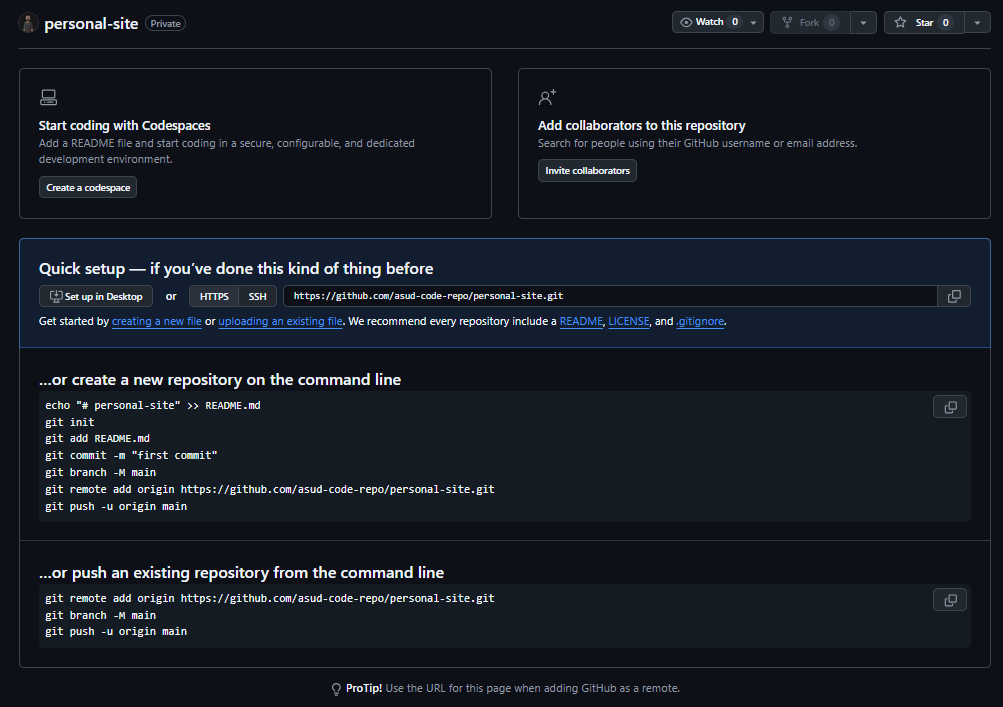
Push it to GitHub. Create an empty repository (don’t initialize it with a README, since your local project already has files), and GitHub shows you the quick-setup page with the commands to push an existing local repo:
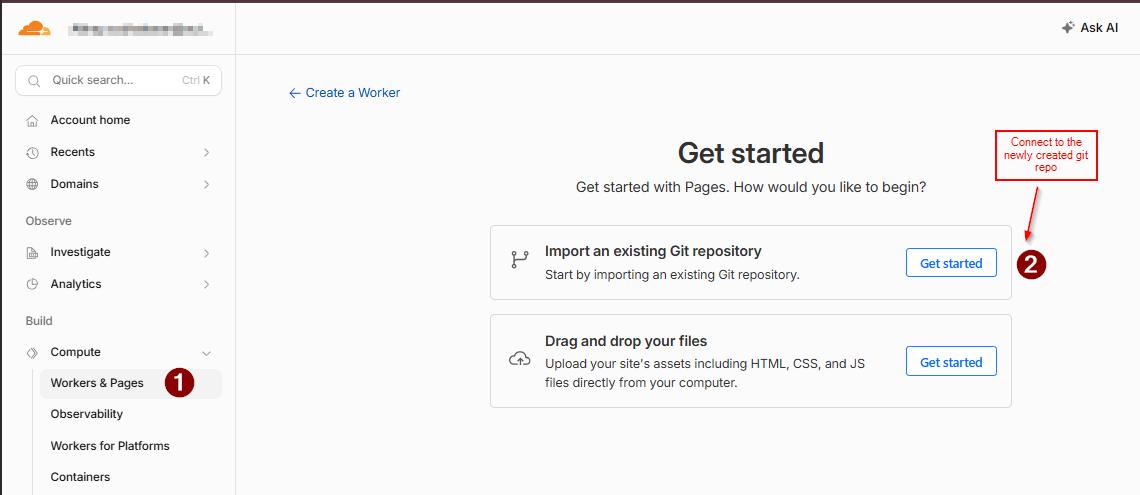
Connect the repo in Cloudflare Pages. From the Cloudflare dashboard: Workers & Pages → Create → Pages → Connect to Git, then pick the repository:
Configure the build. Cloudflare auto-detects Astro as the framework preset here, which pre-fills the build command and output directory correctly. Double-check the output directory says dist, that’s the one setting that actually breaks a deploy if it’s wrong:
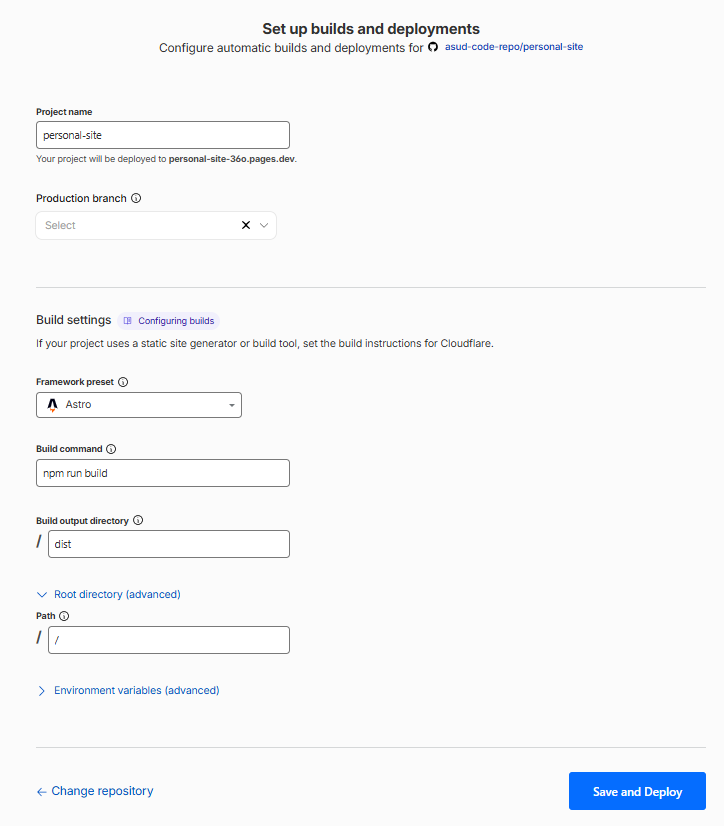
Deploy. Click “Save and Deploy” and Cloudflare builds the project and assigns it a *.pages.dev URL. That URL is live and fully functional immediately, a custom domain is optional polish, not a requirement.
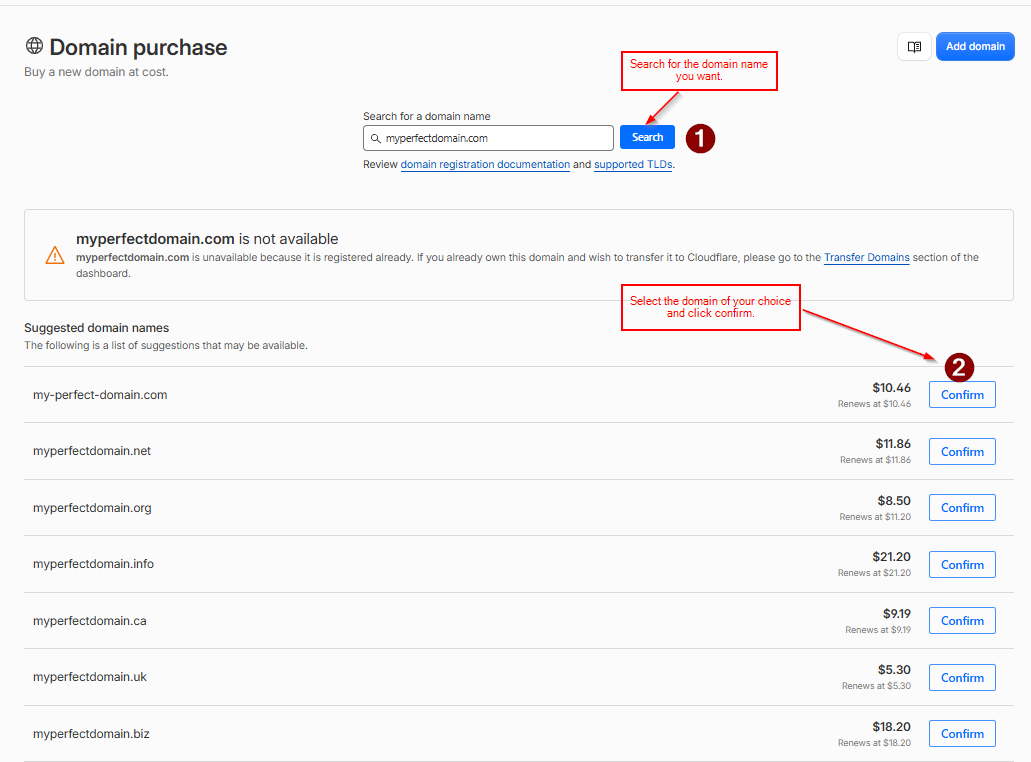
Register a domain, if you want one. Cloudflare Registrar sells domains at wholesale cost with no markup. You can get there from the Domains → Registrations page:
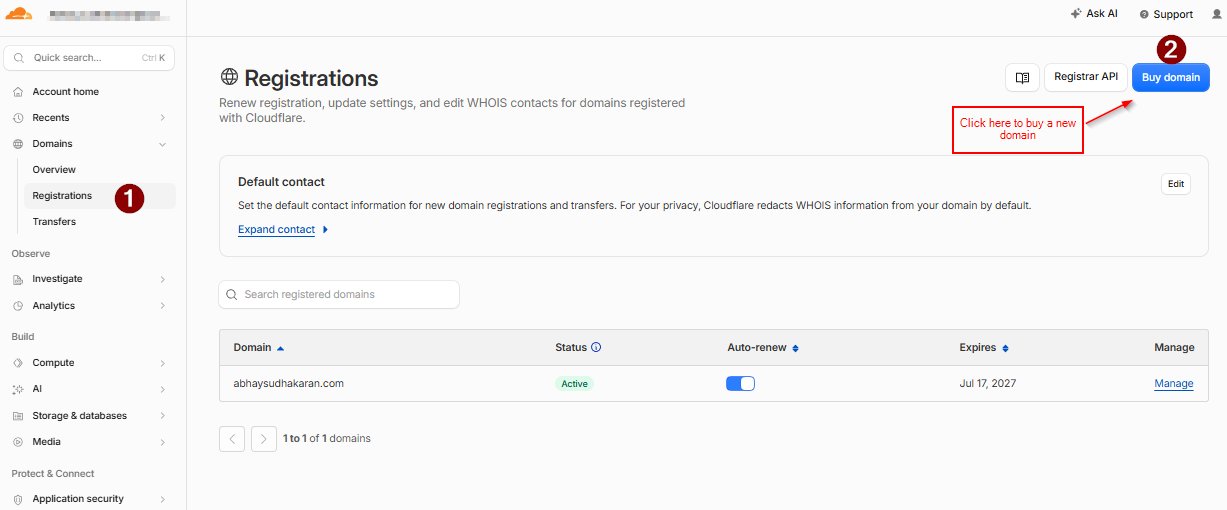
Search for what you want, and Cloudflare shows availability plus suggested alternatives if it’s taken:
Attach the domain to your Pages project. Back in your Pages project, under the Custom domains tab, enter the domain you just registered:
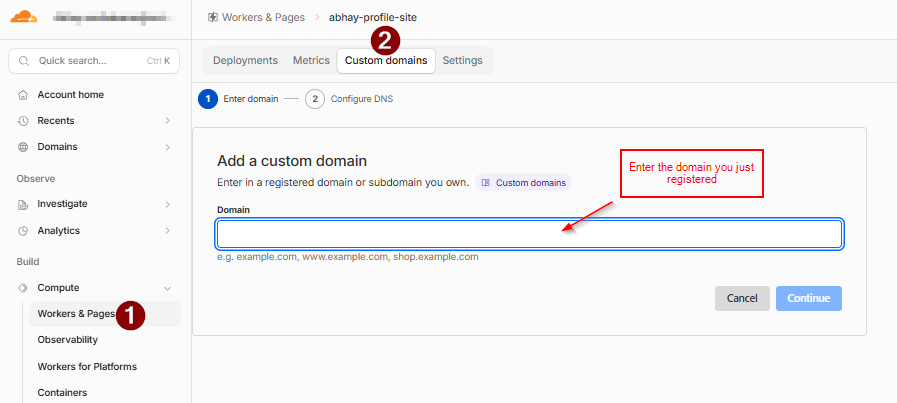
Wait for DNS to verify. Right after adding it, the domain shows a “Verifying” status for a few minutes while Cloudflare provisions the SSL certificate and the DNS record propagates. Since Cloudflare is both the registrar and the DNS host here, there’s no manual nameserver change to make, it’s just a short wait.
Confirm it’s live. Once verification completes, the domain flips to “Active” with SSL enabled, and the custom domain serves the exact same site as the *.pages.dev URL:
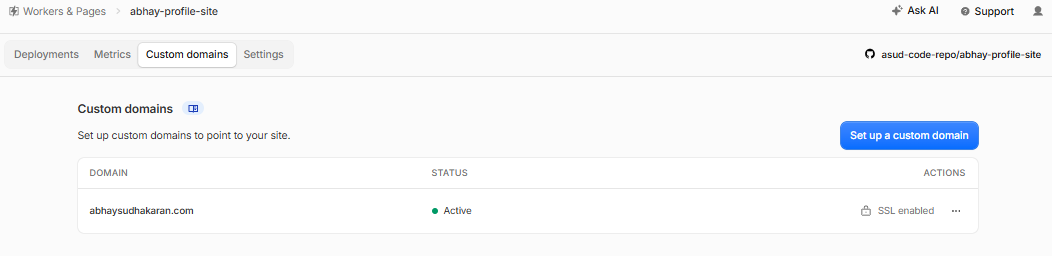
From here, every push to your production branch redeploys automatically. Which is exactly the thing worth putting a branch-based safety net around, covered above.
What it adds up to
None of this is exotic. It’s a static site generator doing what static site generators are supposed to do: fast pages, content that’s validated at build time instead of at runtime, and JavaScript only where something genuinely needs to run in the browser. The interesting decisions weren’t about Astro’s API surface, they were about the boundaries around it: what’s a static asset versus rendered content, what should differ between dev and prod, and what needs a review step before it reaches production.
Building something similar and hit a weird edge case? I’d like to hear about it. Find me on LinkedIn.